Designing AI-assisted decision-making into an enterprise project management dashboard
overview
How might we embed AI directly into the project management workflow so that teams spend less time finding, compiling, and reporting, and more time deciding and acting?
Most project management tools give teams a place to store work. None of them help teams understand it. That gap between data that exists and insight that doesn't, is where this project begins.
MY ROLE
Product design, Interaction design, AI-assisted design, Prototyping
TIMELINE
5 weeks
TEAM
Co led, 2 Product designers
the solution
Instead of adding another tool to the stack, we embedded intelligence into the workflows teams already use. Three flows, each solving a different breakdown between data, visibility, and action.
Resource Lookup
Sprint Alignment
Report Generation
Resource Lookup Search every connected tool at once. Issues are flagged on results before you even open the file.
Initial Observations
The data exists. The updates are logged. The tasks are assigned. But getting a clear picture of what's actually happening still takes hours of manual effort.
20–30%
of the workweek lost searching for information
When documents, chats, and updates are scattered, visibility drops before work even begins.
McKinsey Global Institute
23%
of manager time spent writing status reports
Compiling information that already exists, just trapped across the wrong tools.
McKinsey, The Social Economy
37%
of projects fail from unclear goals and ownership
Misaligned priorities and undefined milestones remain the leading cause of missed deadlines.
Project Management Institute
BECOMING MY USER
Walking in their shoes
Design projects
Working inside the problem
Across 8+ design projects, nothing lived in one place. I have used Jira for designer and developer tickets, Kanban boards on Slack for stakeholder requests, Notion for internal task tracking, Google Drive for resources, and a rotation of Google Meet, Teams, and Discord for communication.
Running a project simulation
UMD Business School
Took a project management course at UMD's business school and ran a 2-month simulation using industry standard legacy PM systems, managing timelines, resources, and stakeholder updates end to end. That's when the manager's perspective really landed.
The tools weren't the problem. The gap between them was.
understanding the user
Five things kept coming up.
Meetings for alignment, follow-ups, and approvals were eating most of the productive day.
Work was spread across Jira, Slack, Notion, and more, every task meant switching context.
No one had a shared view of blockers, workload, or what was actually at risk.
Statuses and reports were being updated manually, even when the data already existed.
Priorities were decided by urgency or pressure, not capacity or logic.
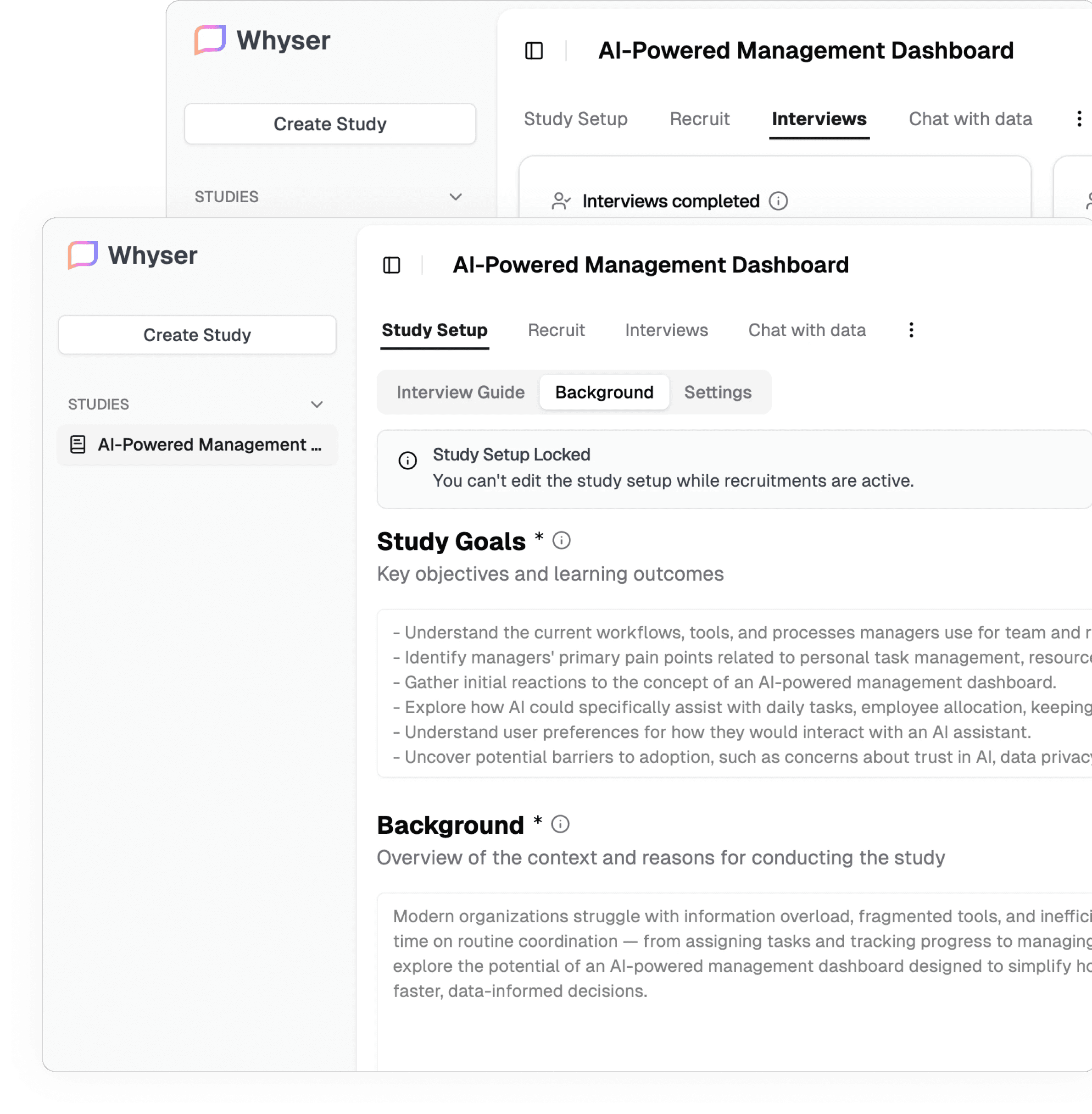
Interviews were conducted using Whyser, a conversational AI research tool.
What's already out there
Every tool solves one piece. None of them connect the pieces.

Task tracking with ownership and sprint structure
Dashboards and AI issue summaries
No report generation
Misalignments and risks still caught manually
Visibility yes. Intelligence no.
Task tracking with ownership and sprint structure
Dashboards and AI issue summaries
No report generation
Misalignments and risks still caught manually
Visibility yes. Intelligence no.

Cross-tool search across Slack, Docs, Drive
Can generate data insights when queried
Reactive; only works when you ask
Insights, not stakeholder-ready reports
Strong cross-tool retrieval. Limited action.

Visual boards and workflow automations
Basic AI drafting and template-based reports
Reports are manual; you trigger, you structure
No cross-system intelligence
Automation exists. Intelligence doesn't.

Task tracking with ownership and sprint structure
Dashboards and AI issue summaries
No report generation
Misalignments and risks still caught manually
Visibility yes. Intelligence no.
Task tracking with ownership and sprint structure
Dashboards and AI issue summaries
No report generation
Misalignments and risks still caught manually
Visibility yes. Intelligence no.
KEy user flows
Flow 01 — Resource Lookup Search every connected tool at once. Issues are flagged before you open the file.
Teams waste hours hunting across tools and still can't tell if what they found is the right version. Search across Drive, Slack, and Notion surfaces flagged document cards. The AI already knows the problem. Resolution happens in context, no switching needed.
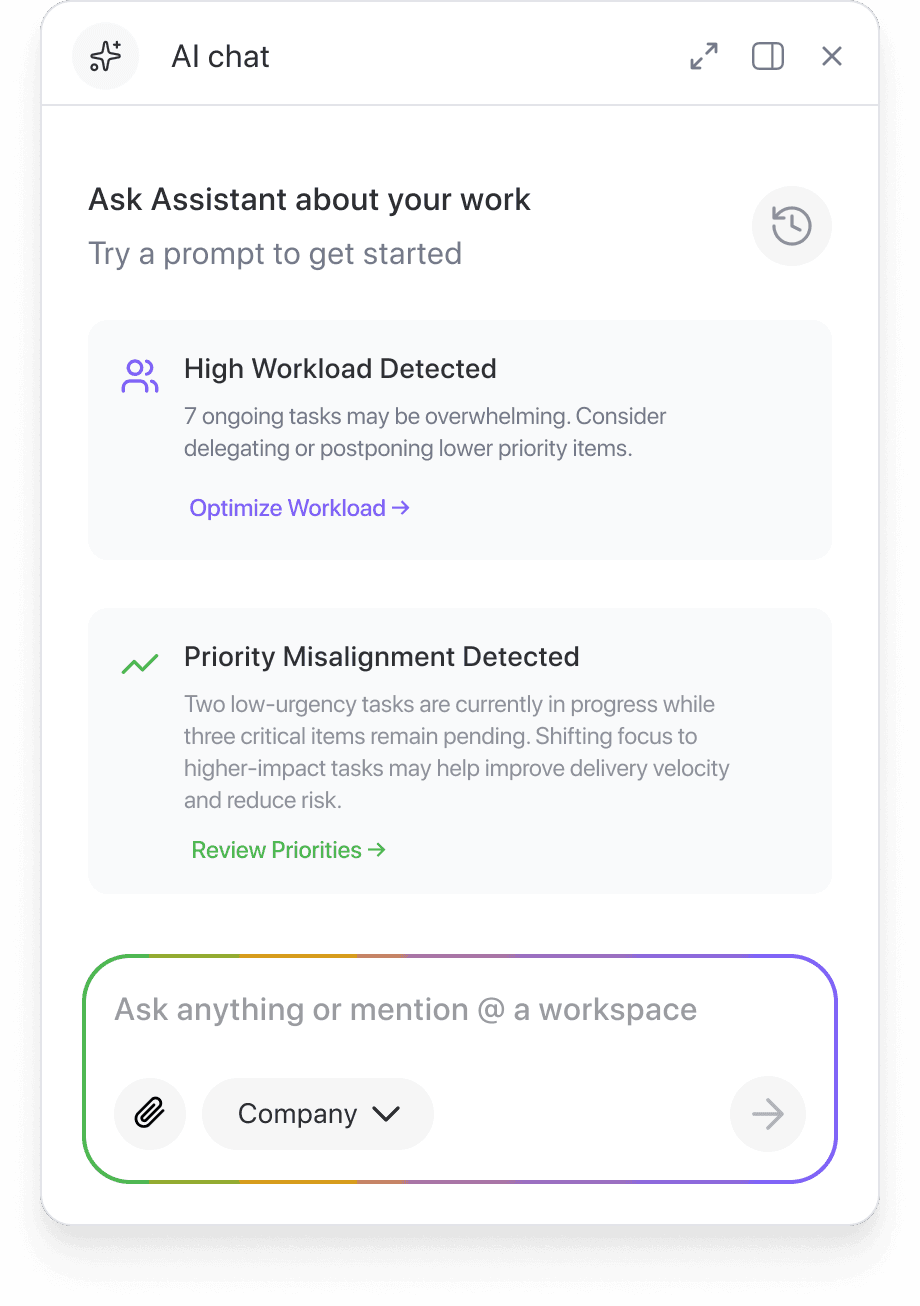
Flow 02 — Sprint Alignment Priority mismatches caught before it's too late to act.
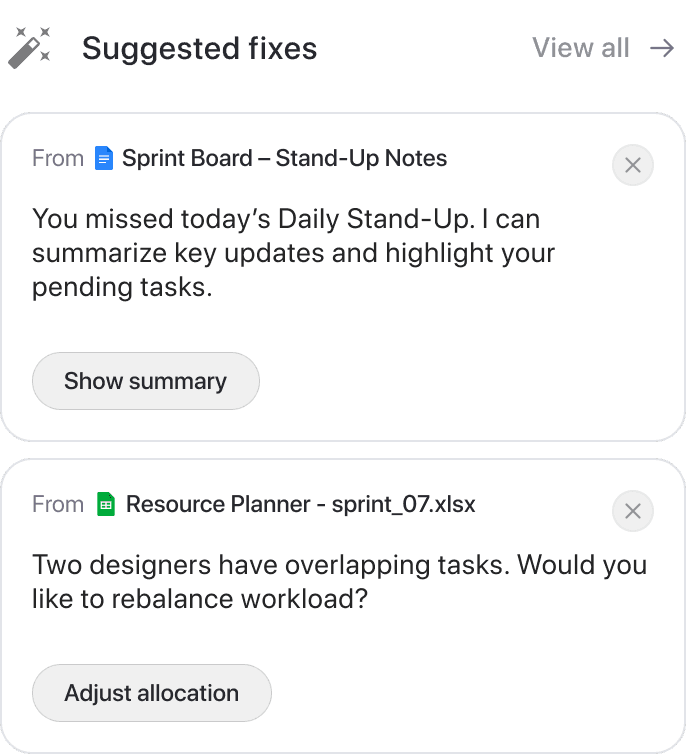
Managers don't know an imbalance exists until deadlines slip. The AI reads the board, spots low-urgency tasks moving while critical ones sit pending, and proposes a fix showing exactly what moves and where. Nothing applies until you confirm.
Flow 03 — Report Generation Reports suggested before you think to ask.
Managers spend up to 23% of their time compiling data that already exists. The Reports panel opens pre-loaded with AI suggestions pulled from live project data. Configure, generate, edit section by section. No starting over.
How I used AI throughout the process
From running interviews to testing the product, AI showed up differently at every stage. But having it sit in the user's seat, that was new.
Interviews
Run through Whyser. It held the conversations, asked the questions, and pulled out patterns on its own. I reviewed what it found.
Opportunity mapping
Scenario exploration
MVP prototyping
User testing
Design system
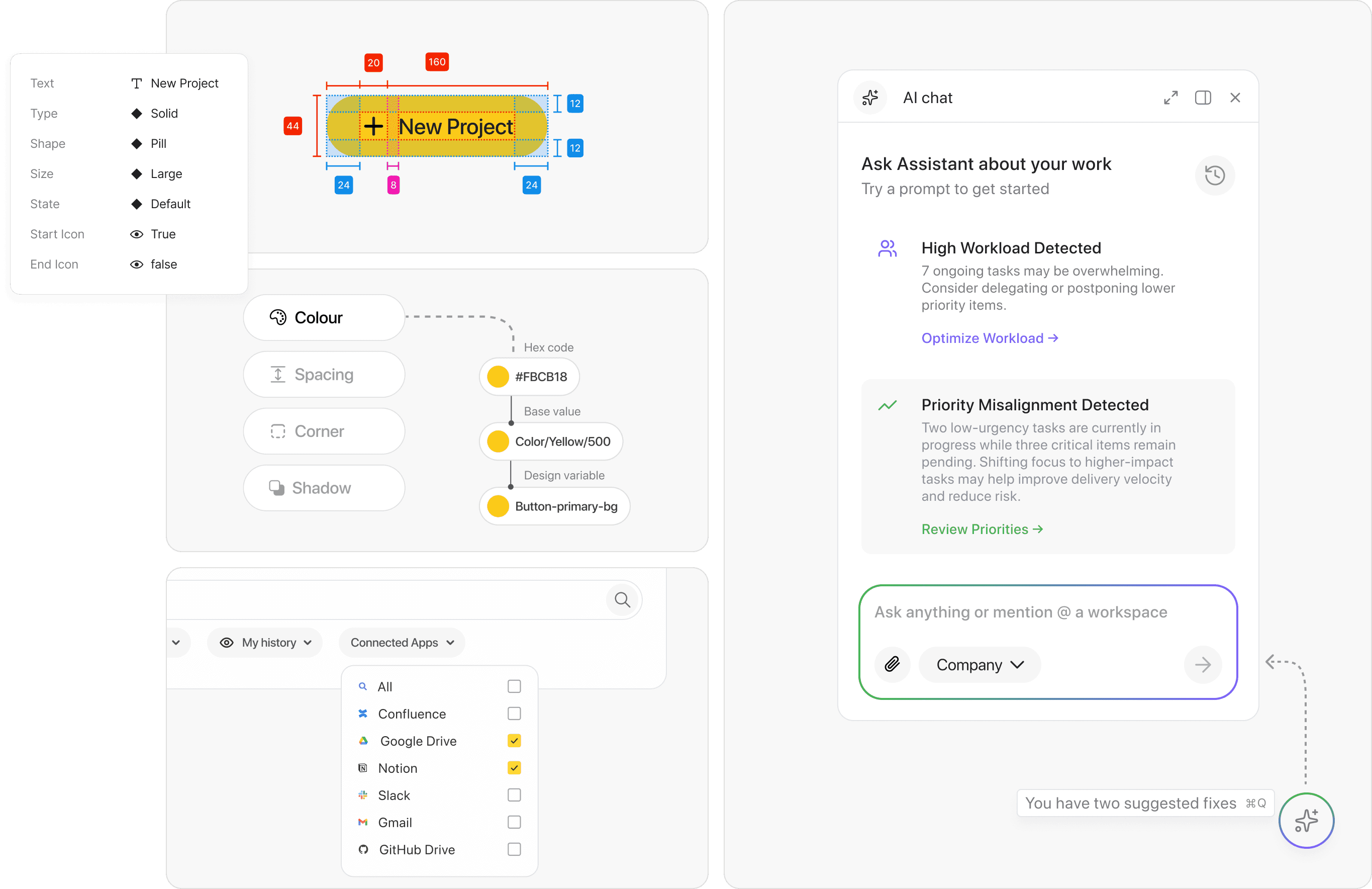
Consistency across three flows, three user roles, and a product built to scale.
Tokens, type, spacing, every component state. Once it was in place, new screens just used what already existed. And because it lives in Figma, we can hand it straight to Figma Make and get consistent designs without starting from scratch.

Reflections & Lessons
Designing with AI made the whole process feel different. It stopped being linear. I was constantly going back and forth, testing things earlier than I normally would, catching problems before they became real ones. Research that used to take days just didn't anymore.
What was interesting though is that AI never made the actual decisions. Every call about how the product behaved, where it drew the line between suggesting and acting, that was still me. AI made me faster. The thinking didn't change.
And honestly the most surprising thing was seeing how many different ways AI could show up in a product. Ambient, assistive, proactive. Each flow used it differently. There's no playbook for this yet. You figure out what feels right and build your own way of doing it. I think that's what makes it exciting.
Designing AI-assisted decision-making into an enterprise project management dashboard
overview
How might we embed AI directly into the project management workflow so that teams spend less time finding, compiling, and reporting, and more time deciding and acting?
Most project management tools give teams a place to store work. None of them help teams understand it. That gap between data that exists and insight that doesn't, is where this project begins.
MY ROLE
Product design, Interaction design, AI-assisted design, Prototyping
TIMELINE
5 weeks
TEAM
Co led, 2 Product designers
the solution
Instead of adding another tool to the stack, we embedded intelligence into the workflows teams already use. Three flows, each solving a different breakdown between data, visibility, and action.
Resource Lookup
Sprint Alignment
Report Generation
Resource Lookup Search every connected tool at once. Issues are flagged on results before you even open the file.
Resource Lookup Search every connected tool at once. Issues are flagged on results before you even open the file.
Report Generation Project data and upcoming deadlines inform report suggestions before you think to ask. Configure, generate, and edit section by section.
Sprint Alignment AI reads your Kanban board and catches priority mismatches early, with a proposed fix ready to review.
Initial Observations
The data exists. The updates are logged. The tasks are assigned. But getting a clear picture of what's actually happening still takes hours of manual effort.
20–30%
of the workweek lost searching for information
When documents, chats, and updates are scattered, visibility drops before work even begins.
McKinsey Global Institute
23%
of manager time spent writing status reports
Compiling information that already exists, just trapped across the wrong tools.
McKinsey, The Social Economy
37%
of projects fail from unclear goals and ownership
Misaligned priorities and undefined milestones remain the leading cause of missed deadlines.
Project Management Institute
BECOMING MY USER
Walking in their shoes
Design projects
Working inside the problem
Across 8+ design projects, nothing lived in one place. I have used Jira for designer and developer tickets, Kanban boards on Slack for stakeholder requests, Notion for internal task tracking, Google Drive for resources, and a rotation of Google Meet, Teams, and Discord for communication.
Running a project simulation
UMD Business School
Took a project management course at UMD's business school and ran a 2-month simulation using industry standard legacy PM systems, managing timelines, resources, and stakeholder updates end to end. That's when the manager's perspective really landed.
The tools weren't the problem. The gap between them was.
understanding the user
Five things kept coming up.
Meetings for alignment, follow-ups, and approvals were eating most of the productive day.
Work was spread across Jira, Slack, Notion, and more, every task meant switching context.
No one had a shared view of blockers, workload, or what was actually at risk.
Statuses and reports were being updated manually, even when the data already existed.
Priorities were decided by urgency or pressure, not capacity or logic.
Interviews were conducted using Whyser, a conversational AI research tool.
What's already out there
Every tool solves one piece. None of them connect the pieces.
Task tracking with ownership and sprint structure
Dashboards and AI issue summaries
No report generation
Misalignments and risks still caught manually
Visibility yes. Intelligence no.
Task tracking with ownership and sprint structure
Dashboards and AI issue summaries
No report generation
Misalignments and risks still caught manually
Visibility yes. Intelligence no.
Cross-tool search across Slack, Docs, Drive
Can generate data insights when queried
Reactive; only works when you ask
Insights, not stakeholder-ready reports
Strong cross-tool retrieval. Limited action.
Cross-tool search across Slack, Docs, Drive
Can generate data insights when queried
Reactive; only works when you ask
Insights, not stakeholder-ready reports
Strong cross-tool retrieval. Limited action.
Task tracking with ownership and sprint structure
Dashboards and AI issue summaries
No report generation
Misalignments and risks still caught manually
Visibility yes. Intelligence no.
Visual boards and workflow automations
Basic AI drafting and template-based reports
Reports are manual; you trigger, you structure
No cross-system intelligence
Automation exists. Intelligence doesn't.
Visual boards and workflow automations
Basic AI drafting and template-based reports
Reports are manual; you trigger, you structure
No cross-system intelligence
Automation exists. Intelligence doesn't.
Visual boards and workflow automations
Basic AI drafting and template-based reports
Reports are manual; you trigger, you structure
No cross-system intelligence
Automation exists. Intelligence doesn't.
Task tracking with ownership and sprint structure
Dashboards and AI issue summaries
No report generation
Misalignments and risks still caught manually
Visibility yes. Intelligence no.
Task tracking with ownership and sprint structure
Dashboards and AI issue summaries
No report generation
Misalignments and risks still caught manually
Visibility yes. Intelligence no.
Task tracking with ownership and sprint structure
Dashboards and AI issue summaries
No report generation
Misalignments and risks still caught manually
Visibility yes. Intelligence no.
KEy user flows
Flow 01 | Resource Lookup Search every connected tool at once. Issues are flagged before you open the file.
Teams waste hours hunting across tools and still can't tell if what they found is the right version. Search across Drive, Slack, and Notion surfaces flagged document cards. The AI already knows the problem. Resolution happens in context, no switching needed.
Flow 02 | Sprint Alignment Priority mismatches caught before it's too late to act.
Managers don't know an imbalance exists until deadlines slip. The AI reads the board, spots low-urgency tasks moving while critical ones sit pending, and proposes a fix showing exactly what moves and where. Nothing applies until you confirm.
Flow 03 | Report Generation Reports suggested before you think to ask.
Managers spend up to 23% of their time compiling data that already exists. The Reports panel opens pre-loaded with AI suggestions pulled from live project data. Configure, generate, edit section by section. No starting over.
How I used AI throughout the process
From running interviews to testing the product, AI showed up differently at every stage. But having it sit in the user's seat, that was new.
Interviews
Run through Whyser. It held the conversations, asked the questions, and pulled out patterns on its own. I reviewed what it found.
Opportunity mapping
Scenario exploration
MVP prototyping
User testing
Design system
Consistency across three flows, three user roles, and a product built to scale.
Tokens, type, spacing, every component state. Once it was in place, new screens just used what already existed. And because it lives in Figma, we can hand it straight to Figma Make and get consistent designs without starting from scratch.
Reflections & Lessons
Designing with AI made the whole process feel different. It stopped being linear. I was constantly going back and forth, testing things earlier than I normally would, catching problems before they became real ones. Research that used to take days just didn't anymore.
What was interesting though is that AI never made the actual decisions. Every call about how the product behaved, where it drew the line between suggesting and acting, that was still me. AI made me faster. The thinking didn't change.
And honestly the most surprising thing was seeing how many different ways AI could show up in a product. Ambient, assistive, proactive. Each flow used it differently. There's no playbook for this yet. You figure out what feels right and build your own way of doing it. I think that's what makes it exciting.